















HopUp Tension Fabric Pop-Up Display: Setup Video & Packing Tips
Updated October 9, 2026
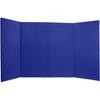
A HopUp tension fabric pop-up display uses an expanding frame to create a portable graphic backdrop. The setup video below introduces the system and shows how the display opens for use at a trade show or event.
Before You Set Up Your HopUp Display
Identify your frame model and size, confirm the graphic matches it, and follow the instructions supplied with your kit. Make space for assembly and inspect the frame and graphic attachment points before opening the display.
Frame and Graphic Setup Checklist
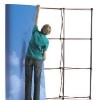
- Expand the frame evenly according to the manufacturer’s sequence.
- Check each required frame connection before adjusting the graphic.
- Align the fabric and end panels without forcing attachment points.
- Confirm the display is stable before adding compatible accessories.
Can the Graphic Stay Attached During Packing?
Some HopUp configurations allow the fabric graphic to remain attached when the frame is collapsed. Confirm that this applies to your kit and follow its packing instructions. Keep the graphic clear of moving frame parts and pack it clean and dry.
Explore HopUp display options or contact TradeShowJoe with your model details for setup or replacement graphic help.









Comments